TLDR
The project at a glance
The domain
Credentialing is how health systems prove a provider is qualified and safe to practice. A specialist gathers and verifies dozens of records, committees of senior physicians review the file and vote, and accreditors like NCQA audit the whole trail.
The scale
6,000 to 7,000 providers credentialed across roughly 70 health systems, each with a core team of 10 to 20 specialists and dozens of external reviewers.
The problem
Our product could collect a provider's records, but the review that decides whether a provider can practice happened outside it, in spreadsheets, emailed PDFs, and screenshots of votes. In a heavily audited process, every workaround bred error, delay, and risk.
The solution
A three-phase solution brought the review into the product. Flags carry the full context committees need to make decisions, a Smart Folder collects its own records and stays editable through review, and templated Committee Review routes the file to every reviewer, captures recommendations, and logs it all for auditors.
What I did
Product Designer and Project Lead, end to end. I collaborated with the Director of Strategy to align UX strategy with business strategy, worked with the Product Owner and principal developers to ensure design feasibility, and mentored a junior designer late in the project on UI refinements, documentation, and dev handoff.
- Research. SME interviews, customer focus groups, artifact analysis, process analysis, and research synthesis.
- Strategy and design. UX strategy, systems thinking, data modeling, and UI and interaction design across all three phases.
- Leadership. Design reviews, executive presentations, and stakeholder facilitation, with end-to-end ownership from kickoff to handoff.
The result
The safety-critical path now runs in the system instead of around it. No spreadsheets, no emailed packets, no file rebuilds. Flags and Smart Folders shipped and are in customer use, and Committee Review is in development. The file never has to leave the system.
The kickoff
Enterprise deals were stalling on committee review
Prospective customers were choosing a competitor due to our lack of committee review functionality. Mid-size customers were making do, but for larger enterprises the gap was a deal-breaker. Credentialing at that scale could not justify the inefficiencies of a fractured, incomplete system.
What the competitor offered
- The ability to flag files that would require a deeper review.
- A method of tracking a provider's progress through different committees.
- The ability for reviewers to view the credentialing file in their product.
What we offered
- PDF packets of documents that could be shared with reviewers outside of our product.
The Director of Strategy decided to invest in a solution that would make us competitive with larger healthcare systems. He requested the UX strategy for a solution that would close the feature gaps, address inefficiencies, and differentiate us from our competitors.
The research
Understanding the committee review process
I needed to identify how our product was falling short of industry needs. To gain a comprehensive understanding of the end-to-end process, I synthesized the findings from qualitative discovery sessions, artifact analyses, and process analyses.
01 · Internal SME interviews
Qualitative discovery with SMEs on credentialing industry standards and their experience with competitors' solutions.
02 · Customer focus groups
Qualitative discovery with three enterprise customers who walked me through their processes for flagging, file prep, and review routing, along with their pain points and how they were mitigating the feature gaps.
03 · Artifact analysis
Analyzed completed documents shared by customers in the focus groups, including completed credentialing files, flag summaries, and audit records created for regulatory audits.
04 · Process analysis
Analyzed customer workflows to identify when they were forced to leave the product or complete redundant tasks due to lack of functionality.
05 · Research synthesis
Synthesized every research task into a shared committee review process flow, and documented where each customer's bylaws diverged on committees, reviewers, and forms. Built a NotebookLM research repository the product, strategy, and development teams could reference.
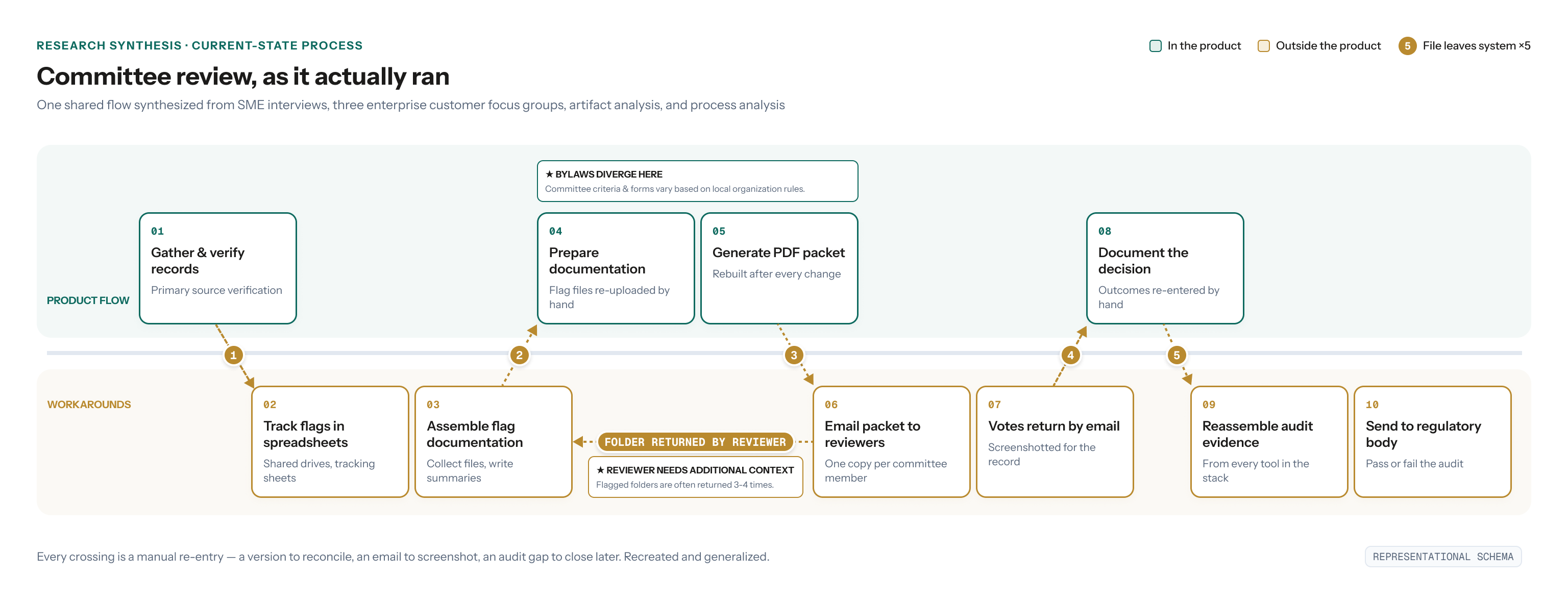
The findings
Feature gaps, fractured audits, and missed opportunities
1 · Flag data lived in spreadsheets
Flags are the context committees rely on to judge whether a provider will practice safely. With no way to flag issues in the product, customers tracked them in outside spreadsheets and shared drive folders just to meet regulatory standards.
2 · Votes lived in email
Specialists emailed PDF packets to committee members, and reviewers emailed back their questions and votes. Committees often return a file three or four times before deciding.
3 · Audits meant reassembly
Audit prep pieced together data from every product in the workaround stack, down to screenshots of reviewer emails. One customer failed an audit over data they actually had.
4 · Standard processes, no templates
Providers of the same type need the same records and the same committees. Without templates or automation, that structure was rebuilt by hand every time. The process lived in specialists' heads, rebuilt from scratch for every provider.
The strategy
Close the gaps, simplify audits, and expedite standard processes
Based on my research, I proposed a three-phase plan for a comprehensive committee review solution that delivers value from the first feature release.
1 · Flags
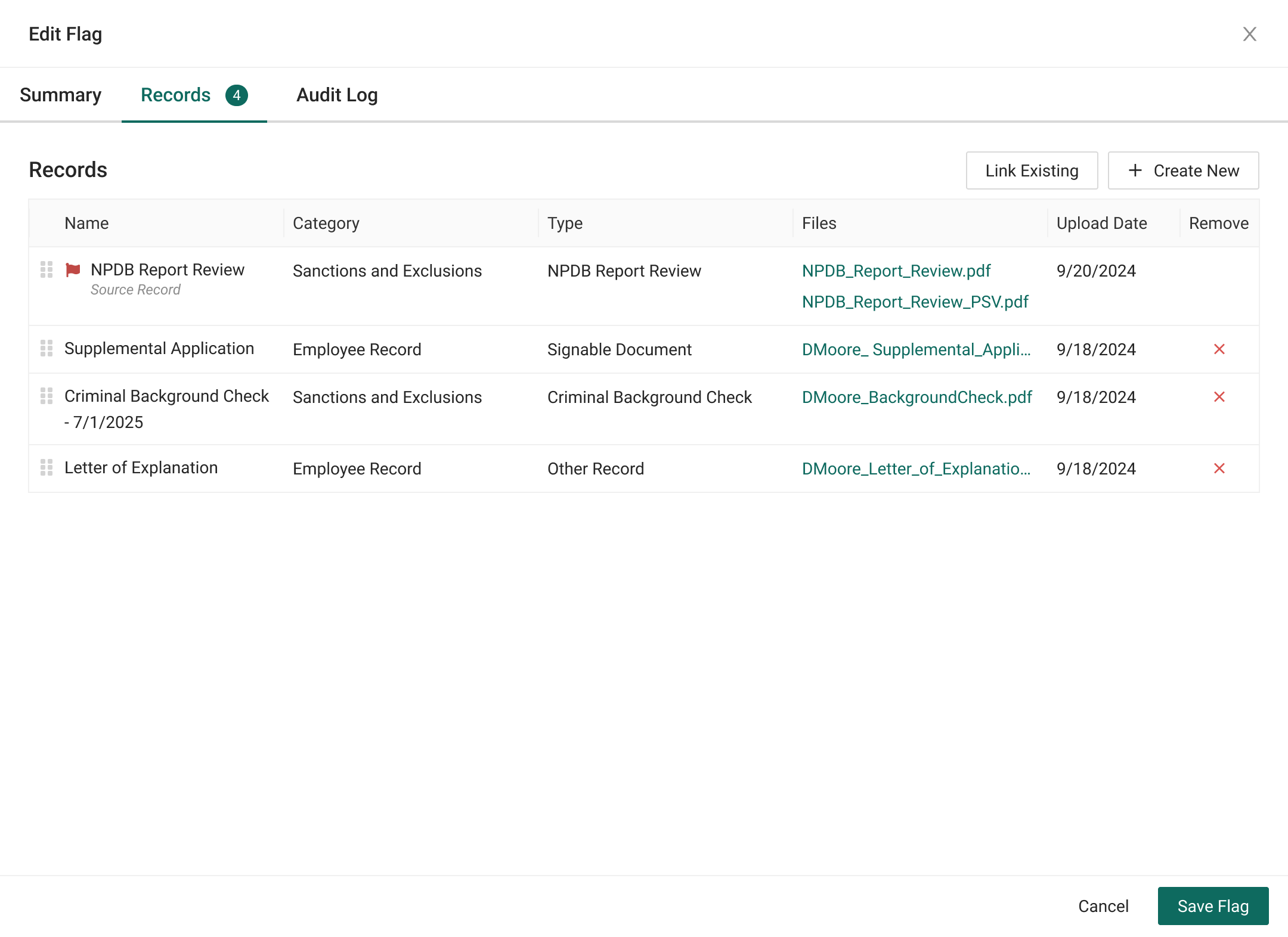
Create the ability to flag records, summarize the issue, attach supporting documentation, and track it throughout the review process.
2 · Smart Folders
Dynamic credentialing file templates that expedite record collection, ensure regulatory compliance, eliminate the need for regenerated PDFs, and act as a single source of truth for audits.
3 · Committee Review
Replace emails with an in-app reviewer experience that tracks all votes and interactions as they occur.
No big-bang release. Each phase has value that builds upon the last.
The process
Each phase included its own cycle of revisions based on customer and SME feedback. Each phase was presented to and approved by the Director of Strategy, the CPO, and the CEO. I consulted the dev and product teams throughout to ensure design viability.
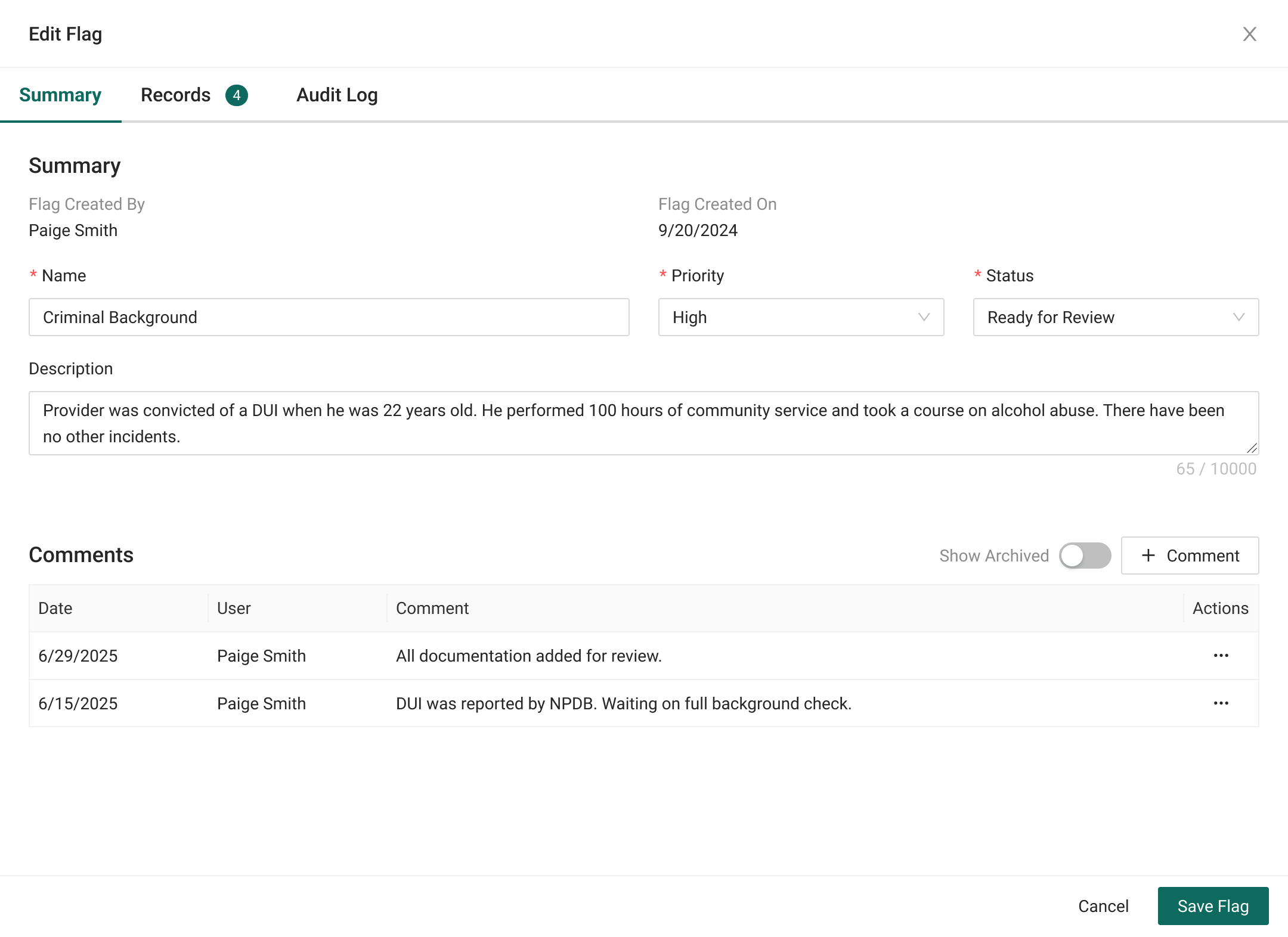
Phase one · Flags
The objects committees decide with
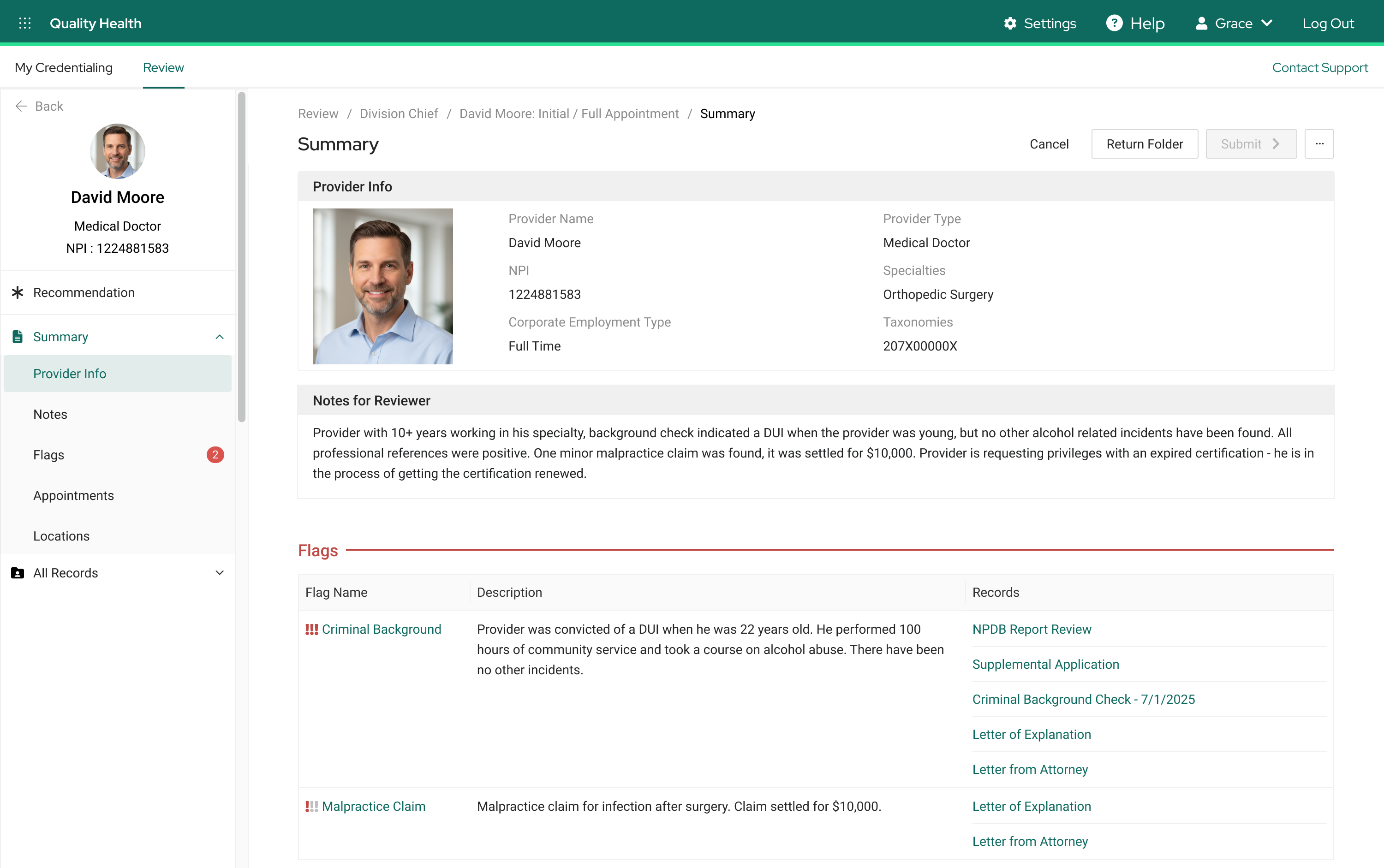
A flag is any issue with a provider that may indicate they are a risk to patient safety: expired certifications, negative reviews by professional references, disciplinary actions by previous employers, criminal background, and more. Specialists collect and summarize everything known about each issue, and the flag and its documentation join the provider's file for the committee's review.
Flags guide the committees' conversations, and committees decide how any patient risk will be mitigated, such as added training or supervision.
The differentiator: flags as conversation guides
The competitor treated flags as labels, alerting reviewers that issues existed without supporting the conversation about them. Specialists were still forced to use external tools for tracking issues and collecting documentation. This design eliminates that reliance and simplifies audits on flagged issues.
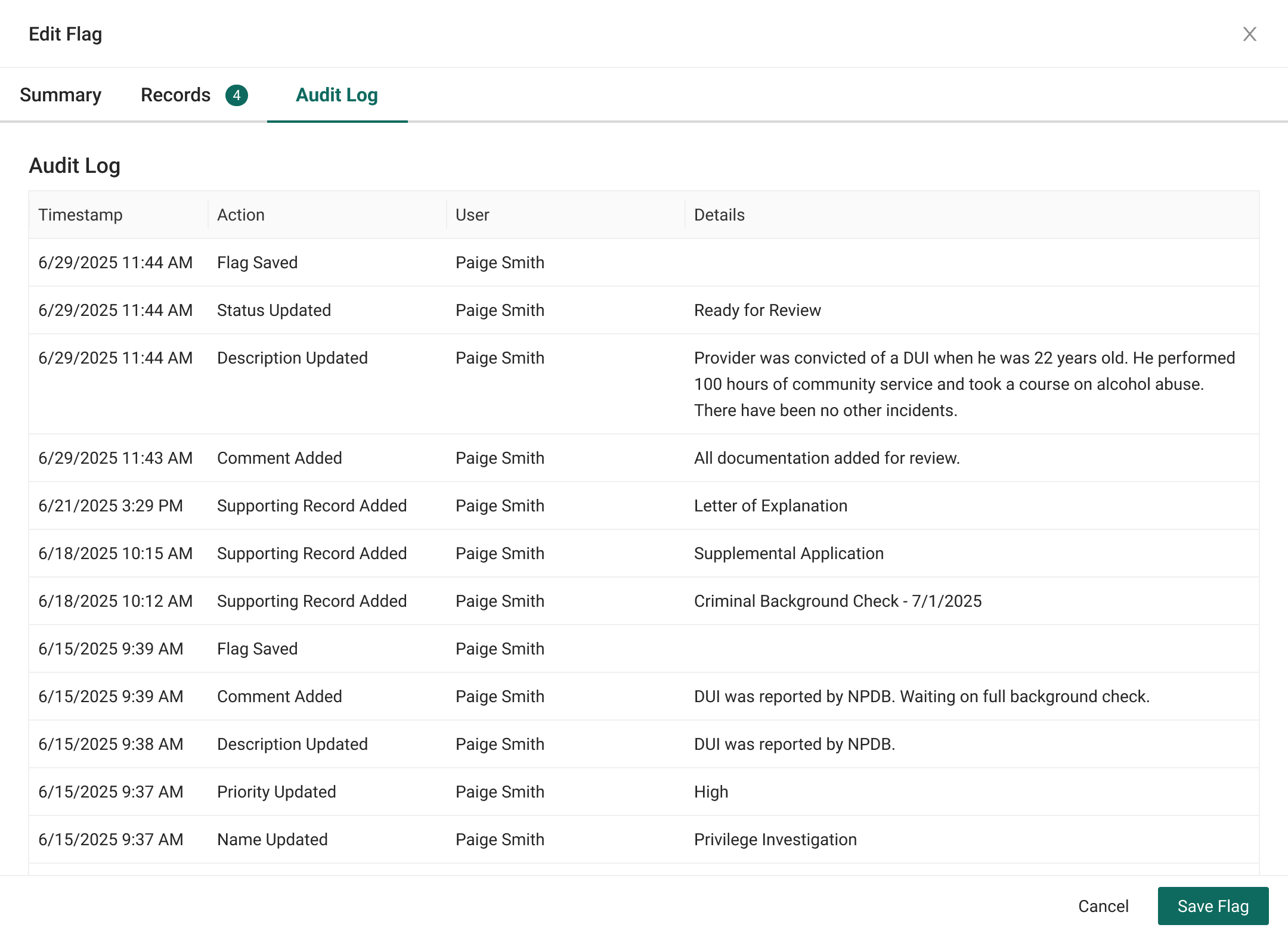
- Flag summary. Top-level awareness of the issue to quickly get reviewers up to speed, with priority so reviewers focus on the highest priority flags first.
- Supporting documents. Quick access to critical documents for deeper discussions about fine details.
- Comments and activity log. Easy documentation of any steps the specialist took to gather the information.
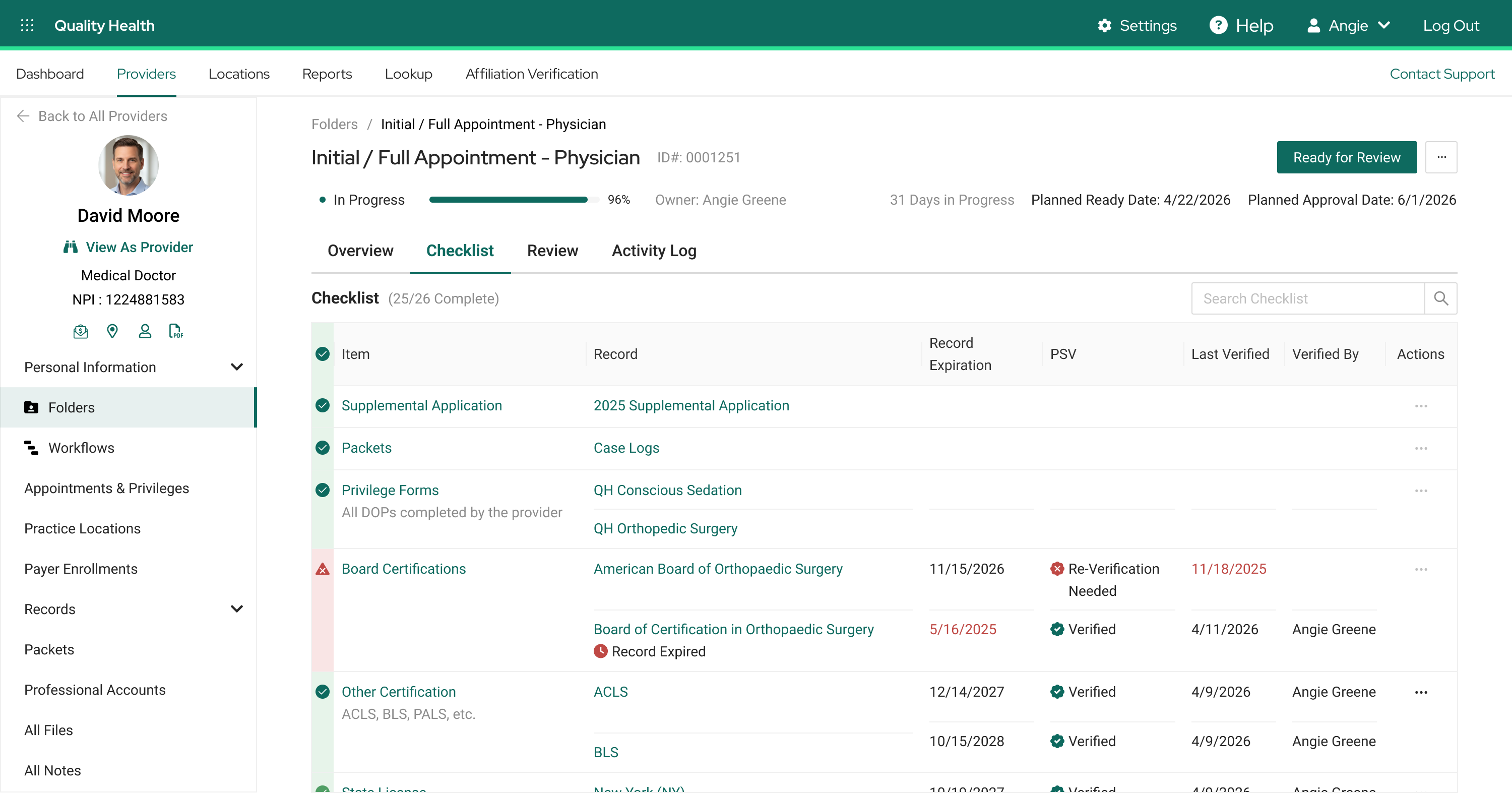
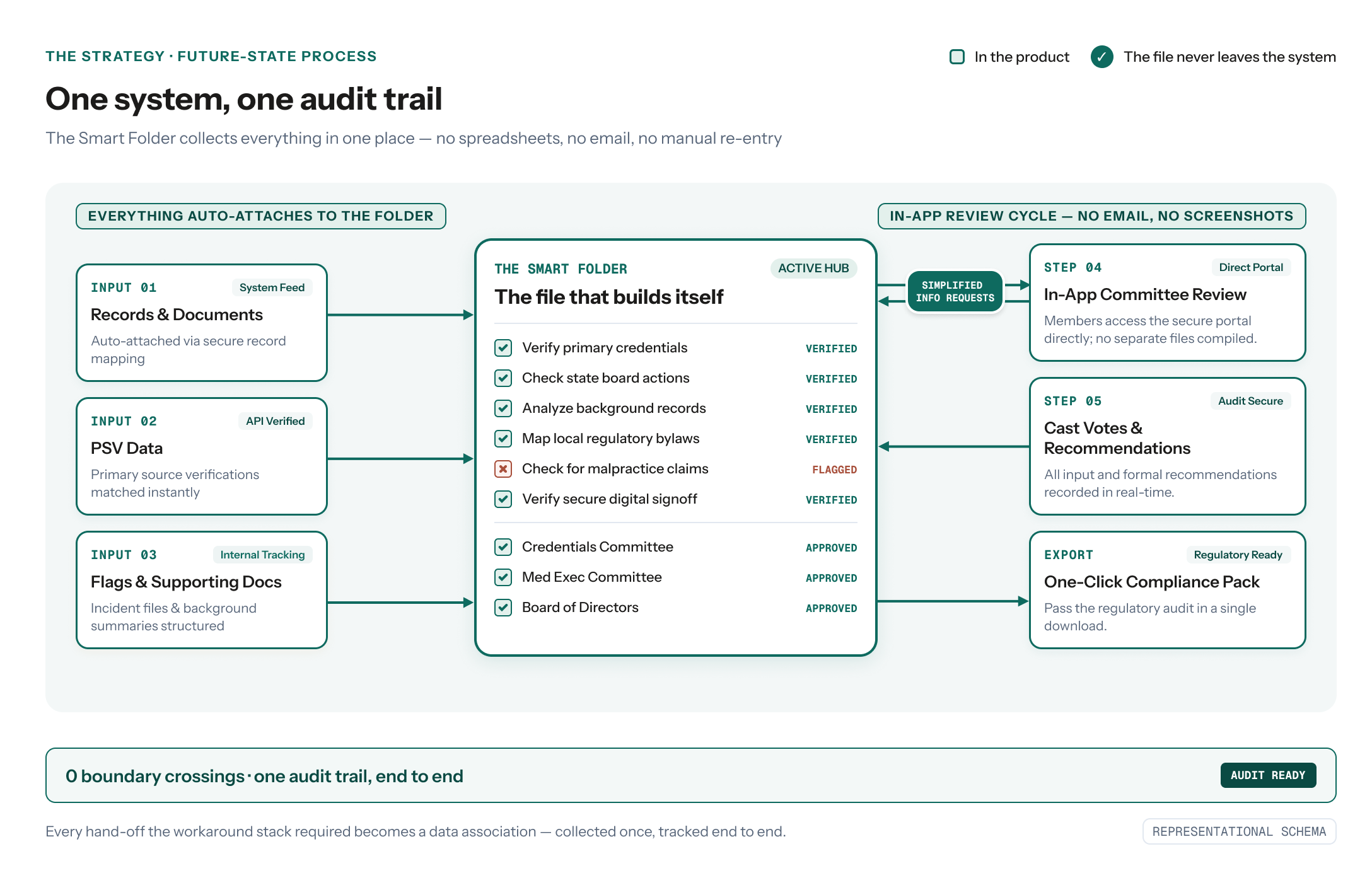
Phase two · Smart Folders
The file that builds itself
A credentialing file's contents depend on context. Provider type, specialty, state, and appointment type all change the required records, but files with the same context share the same structure.
A typical file carries 30 to 50 documents, sometimes more, and NCQA requires every committee record to be verified against its primary source within a set window of final approval. One stale verification bounces the entire file back to the specialist, the provider's start date slips, and an expired record can surface in an audit.
The differentiator: auto-collection and compliance
- Templates for every scenario. Configured once per credentialing context, then reused across every provider that matches it. Flexible enough to fit the variance between customer bylaws.
- Automatic record matching. Records the specialist already gathered attach themselves to the right checklist items. Nothing is filed twice.
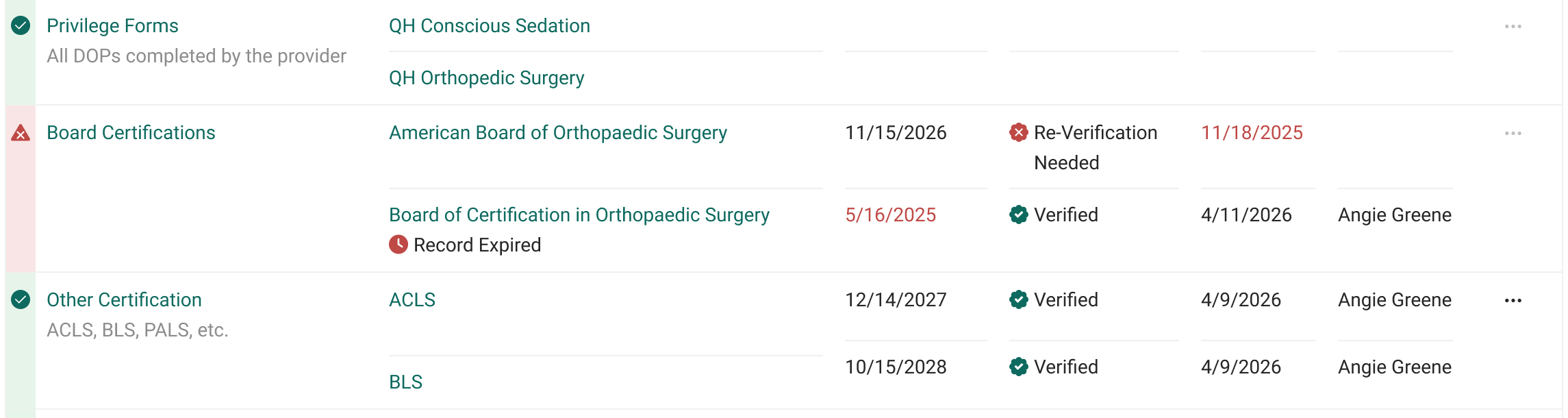
- Flags flow in automatically. A flag added to a record appears in the folder automatically. Updating the flag updates the folder, no rebuilds needed.
- Compliance data on every row. Expiration and verification status sit beside each record, keeping audit readiness visible at a glance.
Collecting records for export is an industry minimum. Automatic record collection and audit documentation were differentiators our competitor didn't offer.
The hard problem: ensuring accurate matches
The first version we tested fell flat. Our data wasn't granular enough for exact matches, so specialists picked from a list of likely ones. That still read as redundant work, because every record was already in the system.
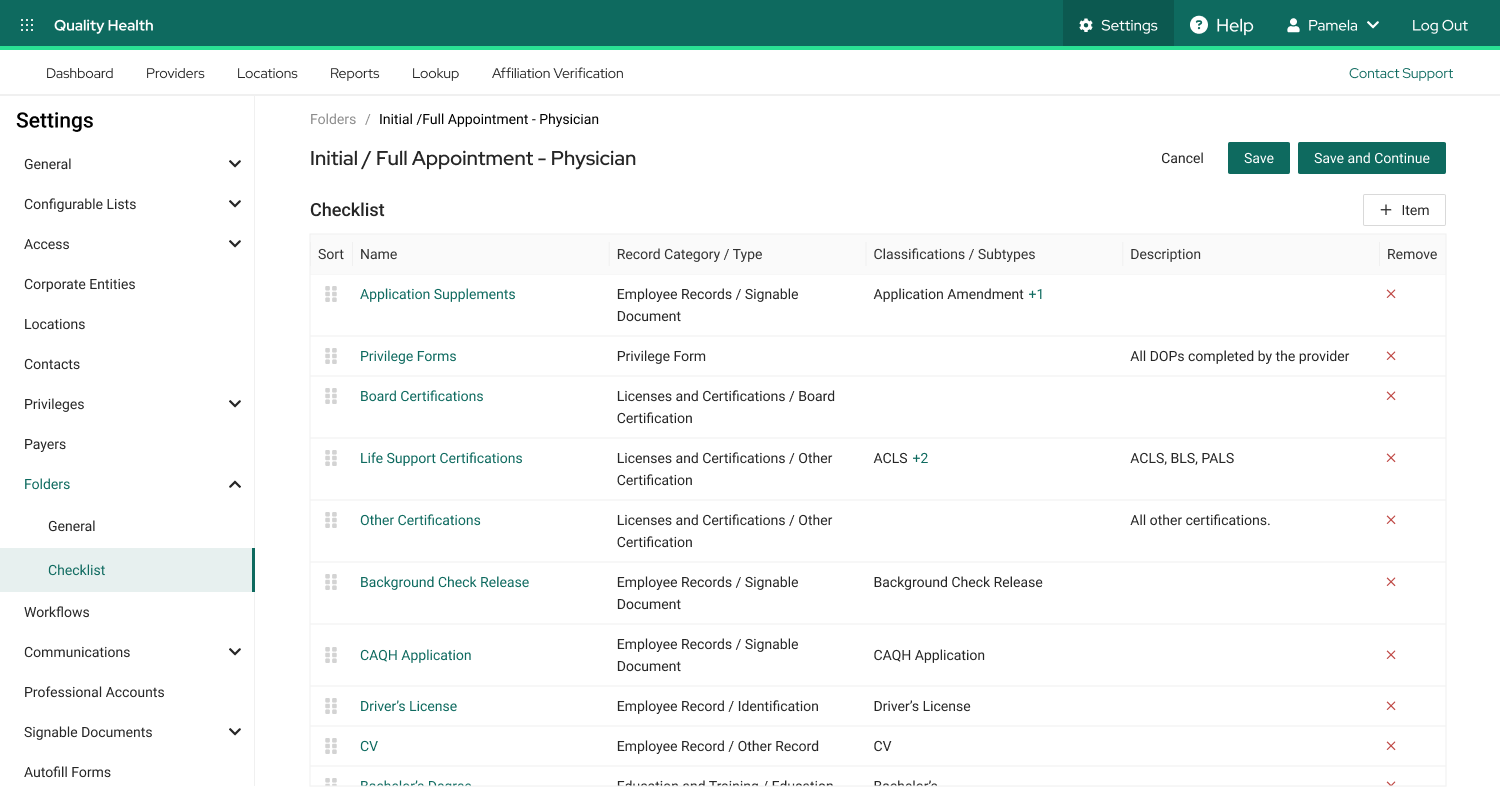
Reliable automation needed sharper data. Categories and types existed, but the checklist had to tell apart records that shared both. Without classifications, a Signed Document item would pull in every document the provider had signed.
Expanding the data model meant more scope and cost. Engineering confirmed feasibility, I made the case with the efficiency gains, and Strategy and Product approved. Define the mapping once, and every folder from that template collects its own records.
Phase three · Committee Review
The review, brought into the system
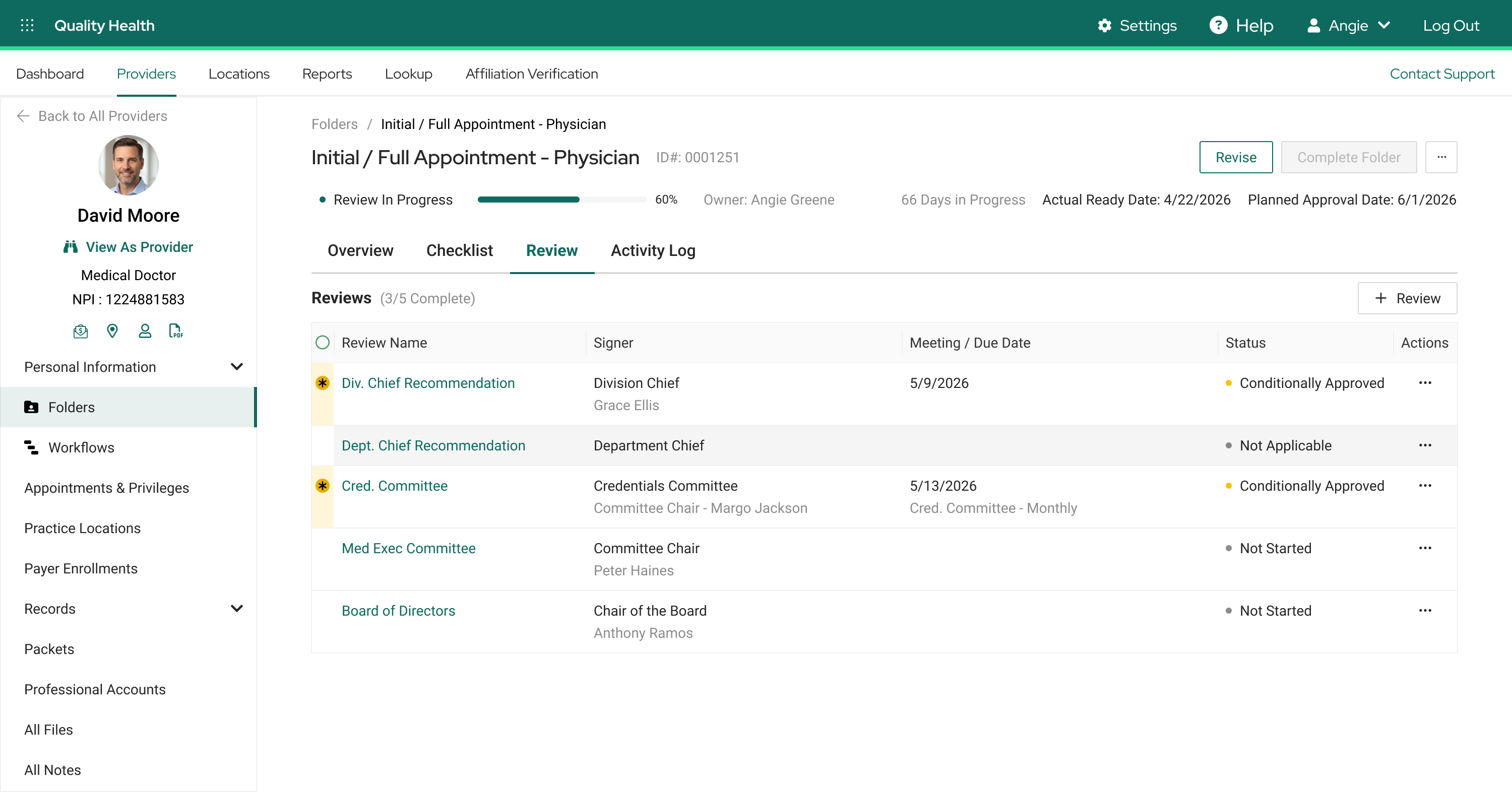
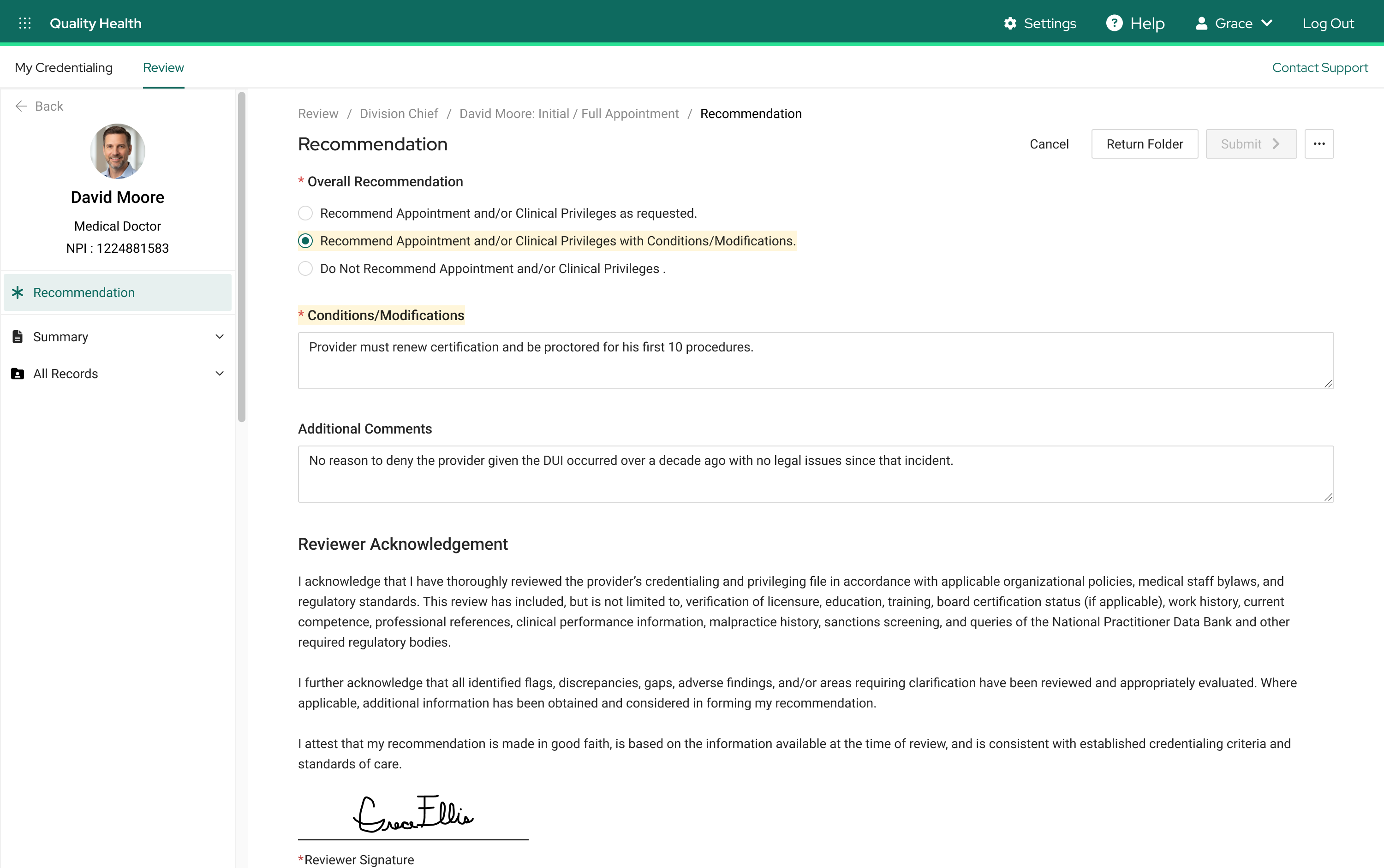
Committee review is the last gate before a provider treats patients. A physician's initial appointment might pass through a Division or Department Chief, the Credentials Committee, the Medical Executive Committee, and the Board of Directors. Each submits a recommendation, approve, deny, or approve with conditions such as proctoring, and it passes forward to the next review. Same context, same path, every time. That predictability is what made the path templatable.
The differentiator: reviews within the folder
- Full context, in-app. Every record and flag sits in the navigation, no PDF scrolling. Requests for more information and recommendations all happen in-app.
- Automated routing. Each submitted decision sends the folder to the next reviewer. No waiting on the specialist.
- Decisions on the record. Recommendations, conditions, and every exchange land in the activity log automatically. No screenshots required.
The competitor let reviewers read the file in-product, but the interactions still happened outside it. This design moves the decisions in-app, with an audit trail that writes itself.
Trust by design
One trusted path from flag to final vote
Users wanted the work gone. Regulators wanted a name on it. Accuracy had to carry from the first flag to the final vote.
- A human completes every item. Records attach to the folder checklist automatically, but the specialist signs off before anything counts.
- Every flag travels with the folder. Flags, their summaries, and their documentation carry into what the committee reads.
- Age configurations ensure regulatory compliance. Records that are out of date by regulatory standards are called out, so specialists can be confident their folders are compliant.
- Status-based protections prevent unwanted changes. Once folders are marked Ready for Review, they are locked down to prevent unintentional edits while awaiting the committees' input.
- One audit trail, end to end. From flag creation to final vote, every action lands in one tracked file.
Outcome · Shipped, and instrumented to prove it
Measurement starts from a researched baseline
The current-state research set the baseline: files returned three to four times per review, five boundary crossings per file, audits reassembled from screenshots. The KPIs I defined measure the collapse of those numbers as adoption completes: file bounce-backs (files returned by committee for missing, expired, or unverified records), audit response time, audit success rate, and time to credential. The credentialing industry depends on accuracy and speed, and these ensure the solution increases efficiency while maintaining the regulatory standards that protect patient safety.
Reflection
Automation with accountability
Designing the Smart Folder checklist taught me how to fully automate a process while keeping a human in the loop. Credentialing is heavily regulated, and NCQA expects a person's approval on every record that enters the file, no matter who assembles it. Automation had to respect that, not work around it.
The answer was never automation or compliance. It was placing a person at the right point in the process. The mapping fills the checklist completely on its own, and the specialist reviews and approves each record it attaches. Specialists spend their time on judgment instead of assembly, and every record carries a name regulators can hold to account.
That balance increased efficiency and maintained accountability at the same time. Getting the mapping that precise took the data-model expansion, the program's hardest design problem and its best-received feature.
This project became a major factor in my promotion to Senior Product Designer.