TLDR
The project at a glance
The domain
Credentialing is how health systems prove a provider is qualified and safe to practice, and until it is complete the provider cannot work or bill. Public industry estimates put the cost of delay at $1,000 to $9,000 per provider per day, and every file must hold up under the regulatory audits that affect a facility's funding.
The problem
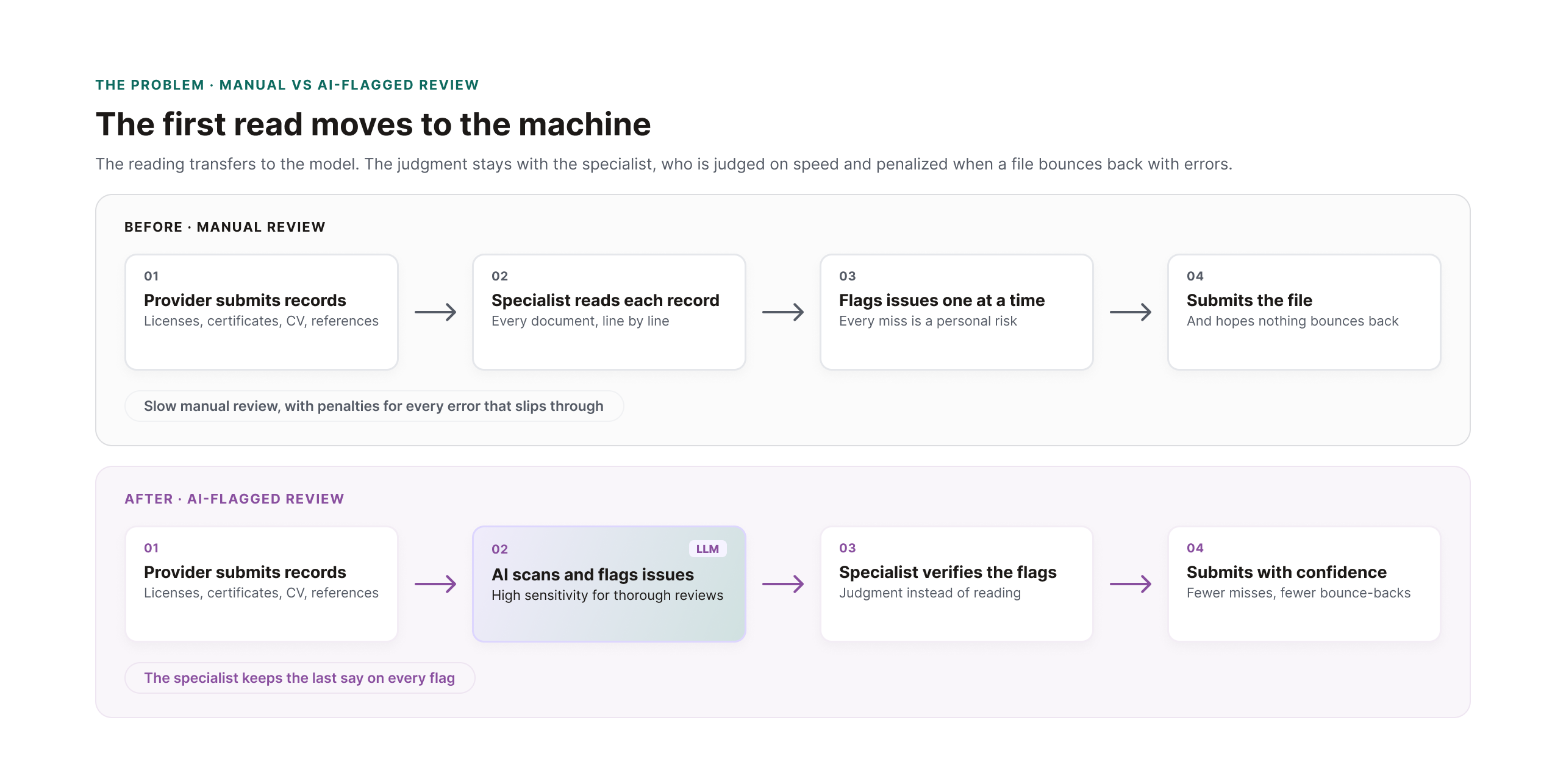
Specialists read every provider document themselves, catching gaps, expirations, and mismatches by eye. They are judged on speed and penalized when a file bounces back with errors. Meanwhile, a competitor's AI assistant was being cited in lost enterprise deals.
The solution
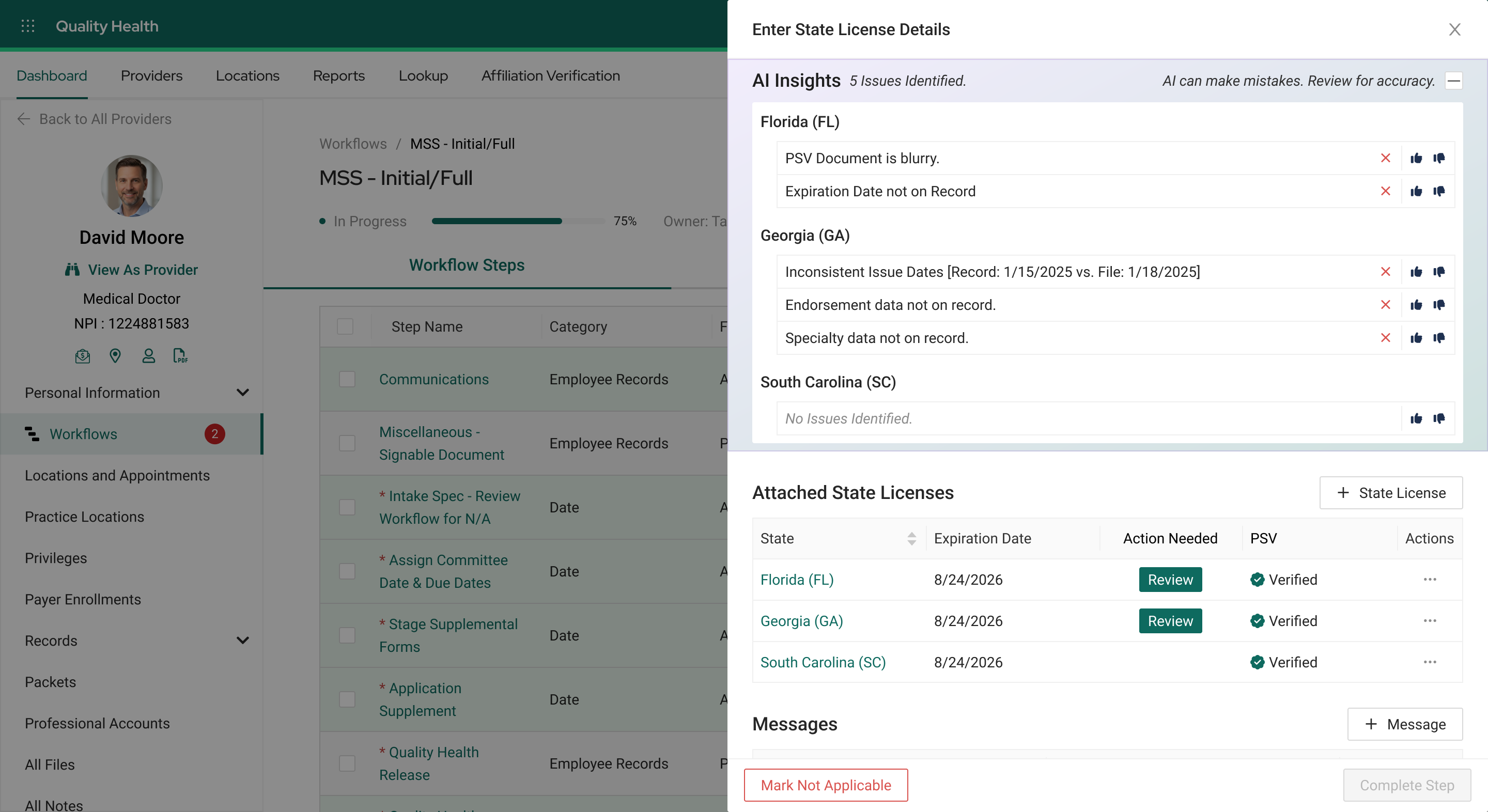
An LLM scans each record when it is saved and flags missing, inconsistent, or risky items inside the record itself. Every finding arrives in the same scannable headline-and-detail structure, unmistakably marked as AI content, written to the audit log, and advisory by design. The specialist always has the last say.
What I did
Senior Product Designer and the sole designer on the feature, from discovery through engineering handoff. I owned the UX strategy end to end: the research, the interaction patterns, the trust design, and the success metrics.
- Research. SME interviews, two customer focus groups with seven credentialing specialists, transcript analysis in a NotebookLM repository, and process flows sorted with engineering by feasibility.
- Strategy and design. The pivotal move from a chat assistant to in-record insights, a fixed structure that makes unpredictable output scannable, and a scan-on-save model that controls token cost.
- Platform leadership. Co-created the AI design patterns adopted across all seven products, cleared through executive approval.
The result
Approved and handed to engineering. The design is projected to cut review time per record and reduce missed issues, validated through customer reviews of the final design with the same specialists from discovery. The KPIs are defined to match how specialists are already judged: time to submission, and files sent back with errors.
The kickoff
Lost deals put AI on the roadmap
A competitor's AI assistant was being cited as a reason prospects chose their product over ours. The Director of Strategy brought the lost-deal feedback from sales and requested the UX strategy for our own AI capability, in support of a company-level objective: reduce time-to-credential and minimize credentialing risk through intelligent automation.
The ask
- Automate auditing of provider documentation.
- Reduce manual review time.
- Catch issues earlier in the process.
- Demonstrate AI leadership in the market.
Meeting the objective meant understanding exactly where an LLM could provide the most valuable support. I worked closely with customers and internal SMEs to find out.
The problem
Specialists carry the risk of every missed detail
Each document fails in its own way: a gap in a CV, an expired certificate, restrictions hidden in a blurry license image, a reference that never came back. Specialists catch these issues by reading everything themselves, and the pressure is personal. They are judged on how fast they complete each file and penalized when one bounces back with errors.
The stakes compound beyond the specialist. A delayed file stalls the provider's start date and the facility's billing, at a public-estimate cost of $1,000 to $9,000 per provider per day.
The research
Building the evidence base
Before any design direction, I built the evidence: two internal SMEs, seven specialists representing two enterprise customers, and every transcript analyzed. I wrote the discussion guides, moderated the sessions, and synthesized the findings.
01 · SME interviews
Sessions with internal SMEs who knew the competitor's assistant firsthand, to understand exactly what we were being compared against.
02 · Customer focus groups
Two focus groups with seven credentialing specialists, mapping real workflows and where insights would matter most.
03 · Analysis of findings
My own analysis paired with a NotebookLM project fed with every transcript and queried for common themes.
04 · Process flows
Findings became process flows and a list of candidate LLM actions, sorted with engineering by feasibility.
The pivotal call
Surface issues before anyone asks
The original plan placed the insights inside a planned chat assistant. The research exposed the flaw: specialists moving fast will not stop to interrogate a chatbot about every record. Flagged issues would keep slipping through.
If the tool already knows something is wrong, it should say so. A specialist should never have to ask.
I recommended a standalone tool inside the record itself, where issues surface the moment the record is opened. Strategy and product agreed, and the insights moved from the chat assistant into the record.
The hard part
Give every answer the same shape
A designer usually knows every state a screen can be in. Here, the scan reads the record and any attached documentation, and different record types surface different issues. Some findings are routine, like an expiring certification. Others cannot be anticipated at all.
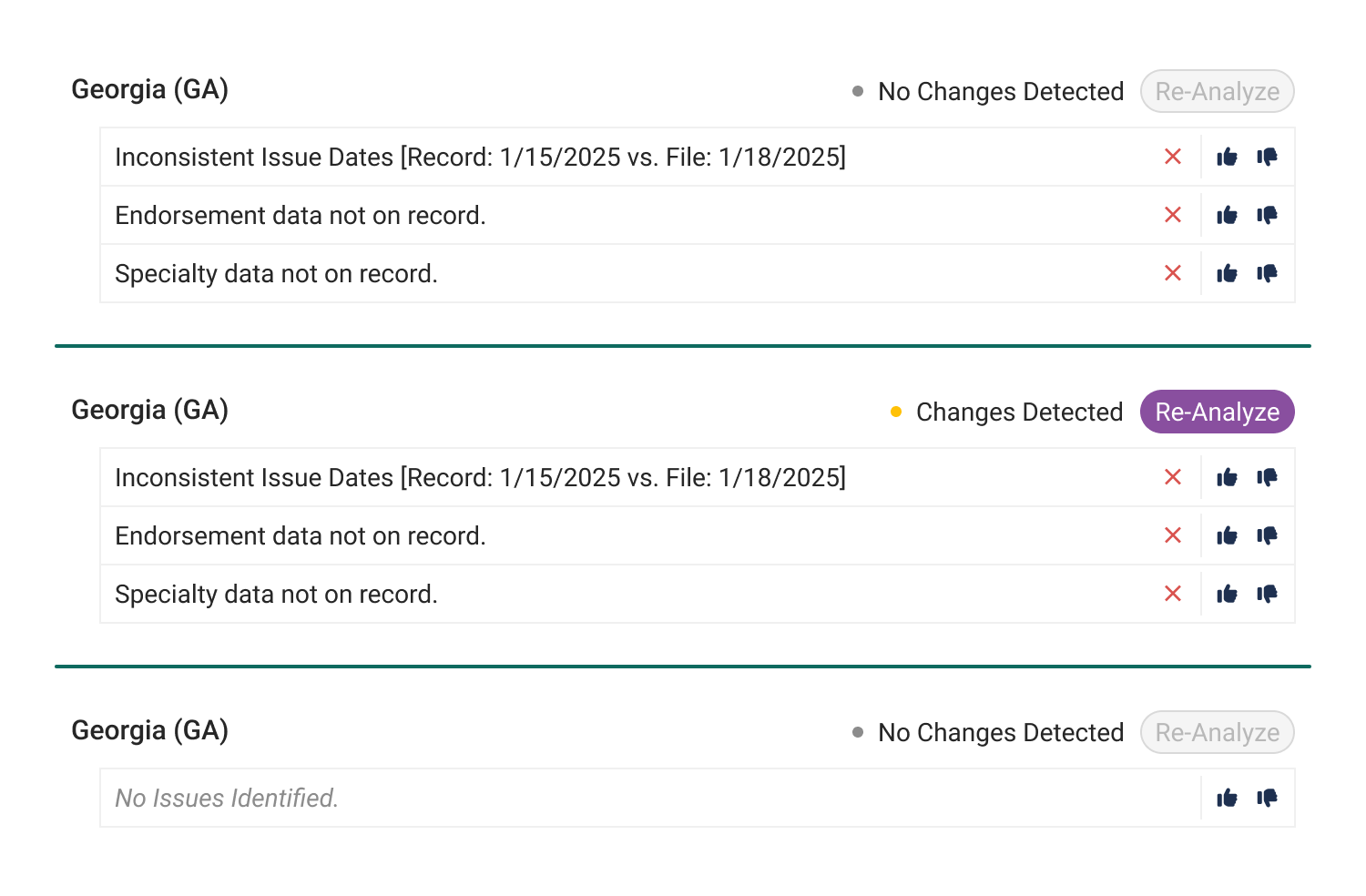
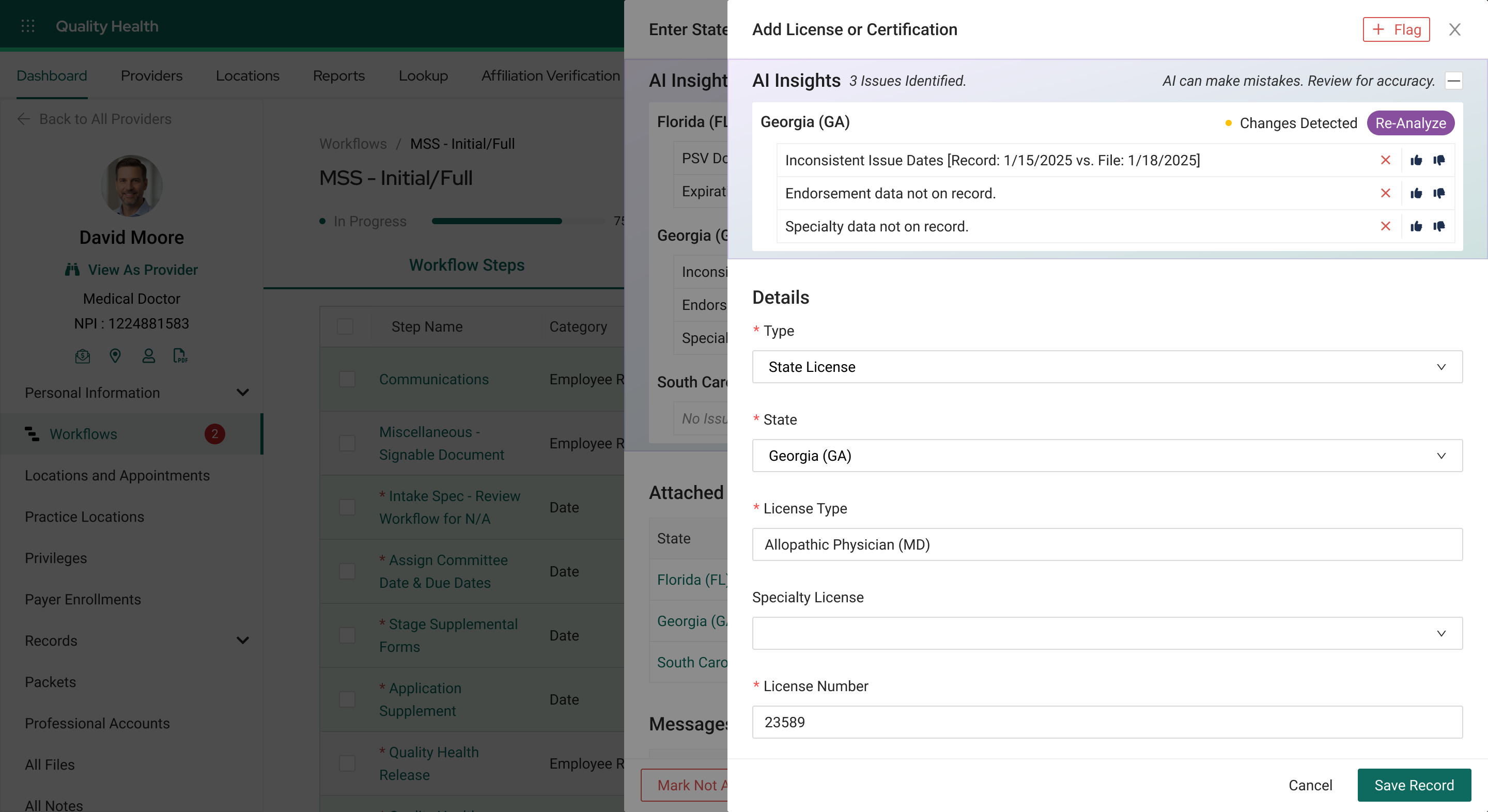
The answer was structure: a fixed, predictable frame that any finding fits into. Every insight renders as a short scannable headline paired with a detailed explanation, so specialists get the main point in seconds no matter what the model finds. The pattern holds whether there is one insight or twenty, and the panel accounts for every state a record can be in, including the ones AI features usually ignore.
- Unscanned. The panel prompts the user to save or analyze rather than sitting empty.
- No issues found. An explicit all-clear rather than an ambiguous silence.
- Unreadable input. A blurry certificate image gets its own insight: ask for a clearer scan.
- Changed since last scan. Existing insights stay visible but are flagged stale, with a re-analyze prompt.
- Workflow-step view. Insights across all attached records at once.
The cost decision
Scan when the data changes, not when the record opens
Tokens are the metered units of text an LLM reads and writes. Every scan consumes them, billed like a utility, which makes scan timing a design decision with a price tag.
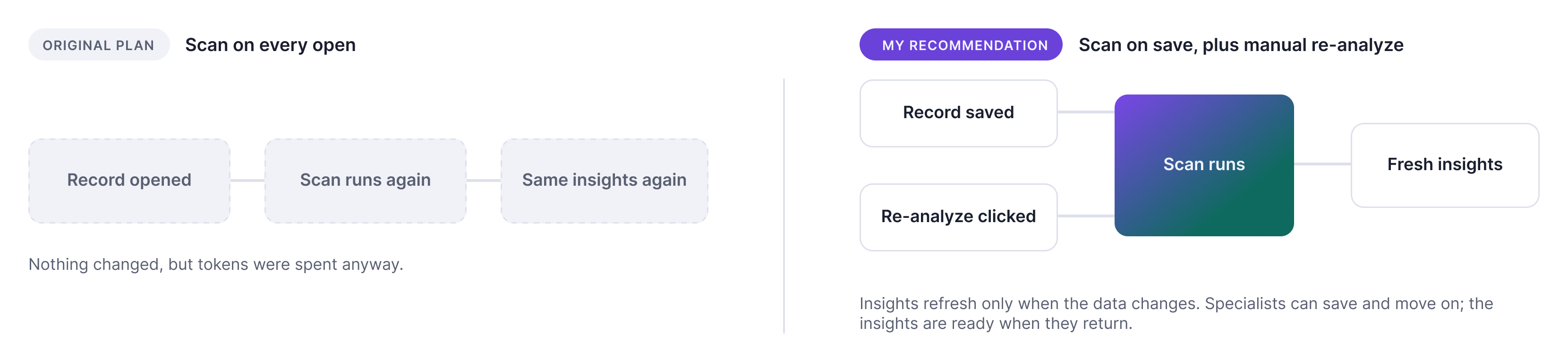
The original plan scanned on every record open. That keeps insights current, but most opens change nothing, so identical insights would be regenerated at full token cost. I recommended scanning on save, when the data actually changes, plus a re-analyze button for instant re-checks. Leadership agreed.
The same model handles latency. Specialists save and move on; the insights are ready when they return.
AI safety and trust by design
Make AI content obvious, auditable, and answerable
- Unmistakably AI. A purple identity and an AI content label set the panel apart from the blue product. Specialists always know what they are reading, and the purple is deliberately off-brand so AI content cannot be confused with system fact.
- Narrated loading. While the model works, the panel narrates each step, so users always know what is happening behind the scenes.
- Auditable. Every scan result is written to the record's activity log, keeping AI contributions auditable under regulatory scrutiny.
- Answerable. Specialists can dismiss an insight, rate it, or send specific feedback directly to the development team.
The specialist has the last say. Every insight is advisory, and a human decides whether it is relevant. That is the design's check on AI bias.
Scaling the patterns
One feature's patterns became the platform standard
The trust patterns raised a bigger question: how should AI content look and behave across the rest of the platform? Working with the Director of UX and the senior designers of two other product lines, I helped define a unified set of AI patterns, including the commitment to purple against the company's blue. The standards cleared executive approval.
The consistency is the point. A specialist should recognize AI content instantly, in any corner of the platform. Seven products serving more than 4,500 healthcare organizations now share the same rules for how AI announces itself.
Reviewed at every step
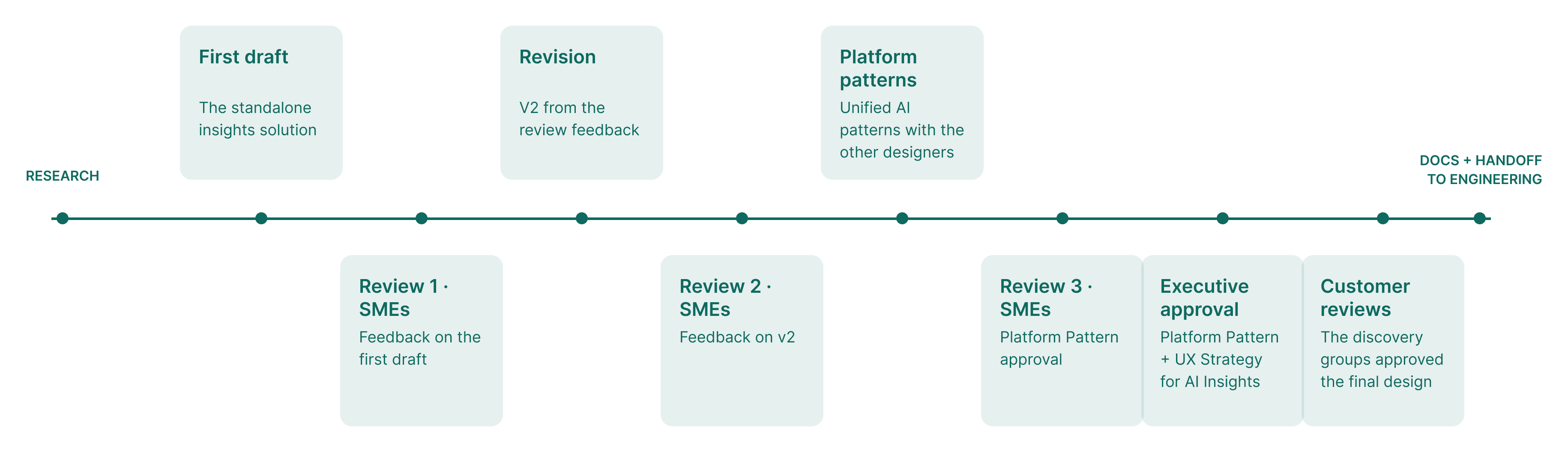
The work was checkpointed throughout: three SME review rounds shaped the drafts, the platform patterns went through executive approval, and the final design went back to the same customer groups from discovery before documentation and engineering handoff.
Outcome · Faster files, fewer bounce-backs, less fear
The measures match how specialists are judged
The outcome is projected until the feature ships, and I defined the KPIs to prove it: time from starting a workflow to the file going out for review, and files sent back with errors after submission. Facilities already track both numbers for their specialists, so the impact will show up in measures customers already watch. If the design works, specialists feel it first.
Reflection
Next time: design for distrust from day one
When a company turns the feature on, it is on for everyone. Version one gives individual users no way to opt out and administrators no way to limit access through permission configuration. That worries me, because trust in AI does not arrive all at once.
If I could do it again, I would make adoption controls first-class scope: org-level permission settings and a per-user way to silence the insights. The beta will answer the bigger question of whether users trust the insights at scale.